
Chuyển từ http sang https và những ảnh hưởng đến SEO
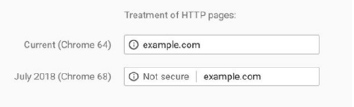
Google Chrome sẽ đánh dấu những trang http “KHÔNG AN TOÀN” từ tháng Bảy 2018
Theo như bài đăng tại https://security.googleblog.com/2018/02/a-secure-w... bởi Emily Schechter (Giám đốc bảo mật Chrome) đã ấn định tháng Bảy 2018 sẽ bắt đầu đánh dấu những trang web dùng http là “KHÔNG AN TOÀN”, bên cạnh việc phát hành phiên bản Chrome 68.
HTTP sẽ không hoạt động tốt với http2
Để có được những lợi ích về hiệu suất rộng lớn đi kèm với http / 2, bạn cần phải sử dụng https vì sự hỗ trợ của trình duyệt.
làm thể nào để chuyển từ http sang https không ảnh hưởng nhiều đến SEO?
Of course, Google is not going to recommend something that is going to negatively impact sites that have taken the time and effort to create great user-friendly, content rich sites that perform well. With the right steps, and following Google’s guidance, you can ensure a smooth migration that does not impact your SEO (although it may wobble for a tiny bit so probably stay away from any big campaigns!)Below are our recommended steps for an SEO-friendly https migration.However, we would always recommend the use of a professional agency if you do not have the experience within this area.At us Marketing, we can complete your https migration and ensure that you do not lose that valuable search equity. Nói với chung tôi about how we can help.
- Take a url crawl of the existing site to identify all pages and links
- Take a url crawl of the new site to identify all pages and links
- Check page rankings for keywords on current site for future reference
- Map each url to outline which urls on http are going to redirect to which urls on https for a redirect strategy.
- Add a self-referencing rel=canonical LINK tag to each url.
- Purchase an appropriate SSL certificate from a reliable CA, ensuring that you have 2048 bit key as a minimum and that your certificate is supported in case anything goes wrong. There are several types of certificates so you should ensure the right one for your needs an pick a reputable supplier.Letsencrypt (link) also offer SSL certificates.
- You should ensure that your SSL certificate is always up-to-date (an auto-renew option is best) and make sure that all of the variations of your domain name are covered by the certificate (e.g. www and non-www)
- Your server will need to support SNI
- Take a copy of the existing site and put on staging server to make all of your site changes and add your ssl certificate initially.Don’t ever just go straight to your live site in case there are any irreparable issues.
- Hold any content and design changes.Now is not the time to start making other changes to your site as this is just something else for Google to contend with.
- Install your SSL certificate and use some software such as Keycdn’s SSL Certificate Check to ensure no issues with it.
- Choose whether to do in sections or full site migration.Very large sites may benefit from sections in order to test impact.
- Update all of your hard-coded links to https.Redirect users and search engines to the https pages with server side 301 redirects using a regex in the .htaccess file.
- Update any custom scripts so that they point to https versions, including third party hosted scripts.Make sure to scan your website for any non-secure content.
- Update your robots.txt file to remove any hard-coded links or blocking rules that may still be pointing to http directories or files.
- Ensure to embed only https content on https pages
- Ensure low traffic time for migration
- Put the https version of your site live
- Add https versions of your site to Google Search Console and set your preferred domain status.
- Submit your sitemap on Search Console for the new version of the site
- Verify that site can be crawled and indexed and that it is not blocked by robots with no meta “non-index” tags
- Use Fetch as Google to check Google Bot is functioning as it should
- Update your Google Analytics profile from http to https in Admin and Property Settings.This way you won’t lose any history.
- Check that correct http status codes are being returned for the pages as you would expect
- Monitor search performance for targeted keywords but expect fluctuation for a few weeks
Câu hỏi thường gặp khác
Chuyển đơn hàng sang tài khoản khác
Thay đổi MuaSSL Intermediate Certificate
Hướng dẫn xuất hóa đơn VAT
Tiêu chuẩn Elliptic Curve Cryptography (ECC)
So sánh ECDSA với RSA
Mật mã đường cong Elliptic (ECC) là gì?
Root Certificates, Intermediate Certificate là gì
Lợi ích của EV Code Sign
Cách xem thời gian sử dụng của chứng chỉ số SSL
Tìm hiểu thêm về các loại SSL - chứng chỉ số - của Comodo
Đơn hàng gặp vấn đề về Thương Hiệu
Bảo hiểm SSL
Tính năng SGC là gì?
SSL xác thực OV là gì?
SSL xác thực DV là gì?
Tại sao tôi nhận được thông báo lỗi CSR không hợp lệ khi tôi cố gắng để kích hoạt?
Tại sao CA không thể gửi email xác nhận vào mail cá nhân của tôi?
Sự khác biệt giữa www.tenmien.com và tenmien.com là gì?
Độ mạnh mã hóa là gì?
Extended Validation (EV) là gì?